















The Nest App Dies in January. Your Saved Clips Don’t Make the Trip.
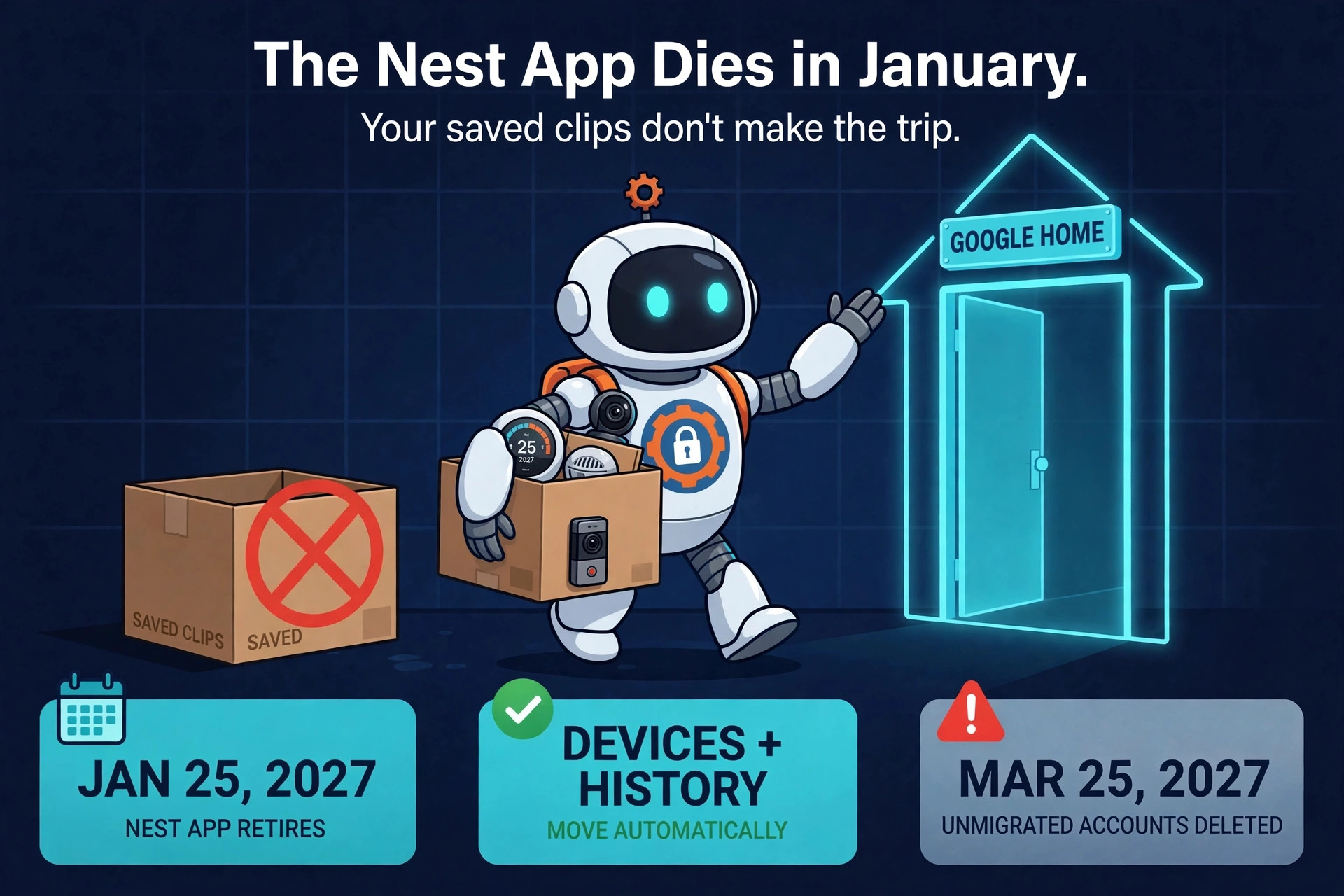
If your home still runs on the Nest app, Google has put an expiration date on it. The Nest app retires on January 25, 2027 — on Android, iOS, TV, and the web at home.nest.com — and control of every Nest device moves to the Google Home app. Google lays out the full transition on its official support page. The good news: almost everything moves by itself. The catch: the clips you saved on the web do not make the trip, and one skipped account step can cost you the entire account.
Two deadlines run the whole story
January 25, 2027 is the loud deadline. The Nest app stops working everywhere, and starting that day your supported devices — and their video history — transfer automatically to the Google Home app. Web control continues at home.google.com.
March 25, 2027 is the quiet one, and it is the one that can actually hurt. If you never migrated your old Nest account to a Google Account, that is the date Google begins processing deletions: the account, its data, and its subscriptions go away. You can download or delete your data yourself any time before then — after then, Google decides for you.

What transfers — and what stays behind
Google says every supported Nest device from the last decade keeps working in Google Home. That covers the Nest Learning Thermostat (3rd and 4th gen), the Thermostat E and the 2020 Nest Thermostat, temperature sensors, Nest Cams and doorbells including the first-generation wired models and the Cam IQ line, the Nest Hub Max camera, Nest Protect (2nd gen), and the Nest x Yale Lock. Your video history — event recordings and 24/7 history — transfers with the cameras. If you pay for Nest Aware (1st gen), it switches automatically to a Google Home Premium Advanced subscription at no additional cost, with no card re-entry.
What does not transfer is the saved clip library on home.nest.com. Clips you saved through the Nest web app stay behind. The only way to keep them is to download them yourself before January 25, 2027, using the one-click “Download All” button on the site. After the move, home.google.com still lets you watch live streams, scrub through history, and download clips up to five minutes long — but the old saved library is simply gone if you never grabbed it.

The three things to do now
1. Download your saved clips. Go to home.nest.com and hit “Download All.” This is the only step with real homework, and it takes minutes.
2. Check how you sign in. Open the Nest app’s sign-in screen. If you tap “Sign in with Google” and see your home, you are already migrated — anyone who started with Nest after August 19, 2019 is. If you sign in with a separate Nest password, run the one-time “Migrate to a Google Account” step in the Nest app settings, well before the March deadline. One note: a Google Workspace account can now be linked, but Google warns it may not get full functionality — a personal Gmail account gets everything.
3. If you are already on Google Home, do nothing. Once your account is linked, thermostats, locks, and alarms appear automatically, and cameras follow on January 25. No QR codes, no ladders, no re-pairing.
What life looks like in Google Home
Google Home is not just the Nest app with a new name. It adds a customizable Favorites dashboard with live camera feeds, support for thousands of Works with Google Home and Matter devices alongside your Nest gear, stronger automation building, and “Ask Home” — Gemini-powered natural-language control and search. Premium Advanced adds detailed camera event descriptions and a scannable daily Home Brief recap. Google’s stated reason for the retirement is honest enough: owners have juggled two apps for years, and one app gets all the engineering and security attention.
That concentration cuts both ways. One account now guards your cameras, your lock, and your smoke alarms — which is exactly why the migration step deserves care. Connected home gear is a proven target: Google itself just dismantled a botnet of 1.3 million backdoored TV boxes, and hacked refrigeration systems showed how fast “smart” hardware becomes a liability. Treat the Google Account behind your home the way you would any security account — strong password, two-step verification on. The camera on your wall earns the same suspicion as any other lens pointed at your life.
The honest catch
Google admits that “a small number of legacy features are not currently supported” in Google Home — and this page does not list which ones. If your setup leans on some obscure Nest-era feature, test it inside Google Home before January, not after. Everything else about this shutdown is unusually gentle: your hardware is not being bricked, your history moves, your subscription carries over. The only way to lose anything here is to do nothing — skip the clips download, or leave an old Nest account unmigrated past March 25, 2027. Two dates, three small tasks, and your home makes the move intact.