
Eight Seconds. Your Cloud Key Was Already Stolen.
Seven point eight six seconds. That is how long a cloud key survived in a public Docker Hub image before someone used it. Not seven seconds to find it — seven seconds to spend it. By the time you finish reading this sentence, the key would already be gone.
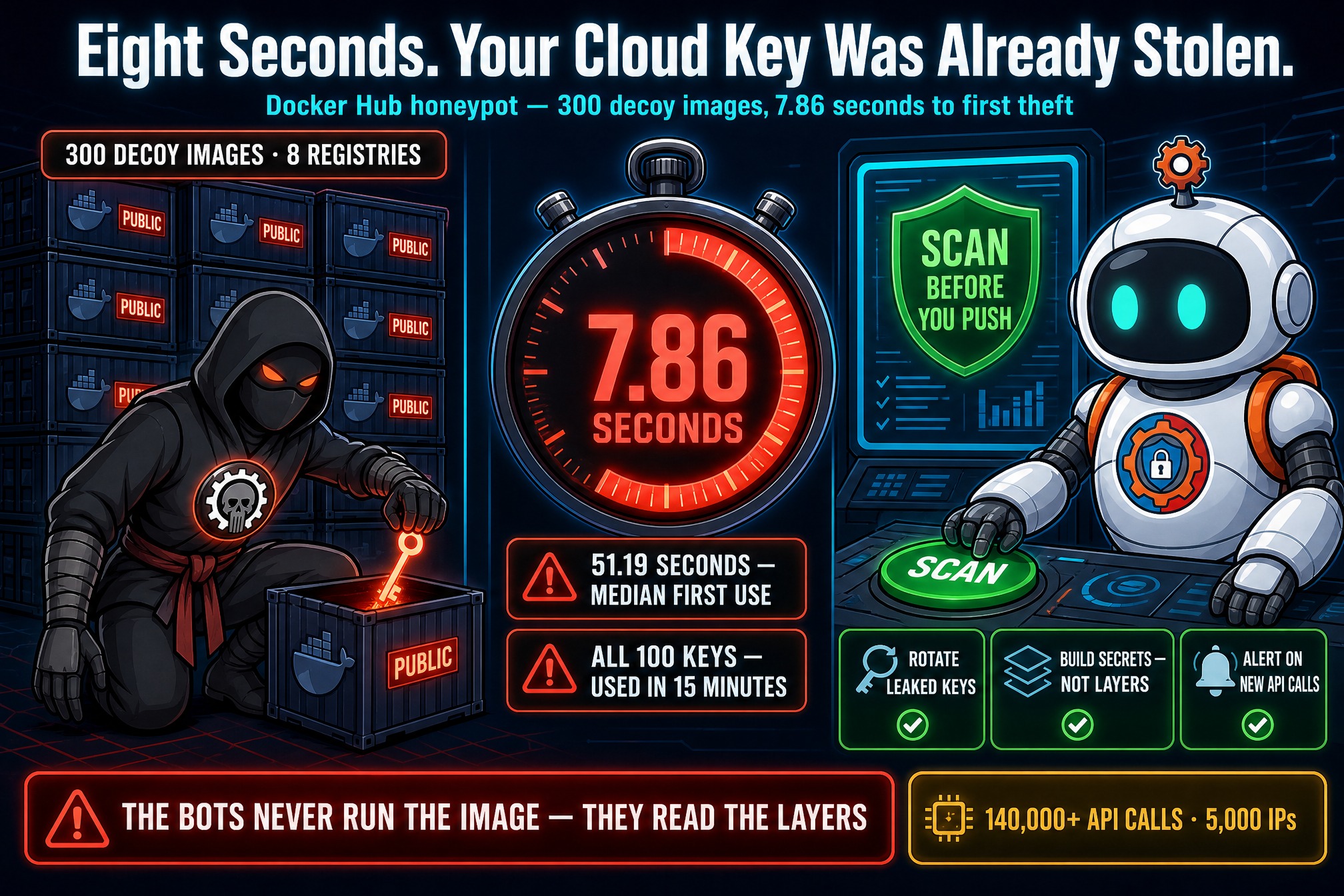
That is the headline number from a honeypot experiment by two researchers at Stony Brook University, Billy Tsouvalas and Nick Nikiforakis, presented this week at the ACM Conference on Computer and Communications Security. Over four months they published 300 decoy images across eight public container registries, each planted with credentials: AWS keys, OpenAI and Anthropic API keys, and decoy SSH and database logins. Then they watched what happened to them.
The Numbers: Faster Than a Human Can React
What happened was fast — faster than any human process could possibly respond. The researchers’ images were pulled more than 75,000 times, and the planted AWS keys alone received over 140,000 API calls from 5,000 unique IP addresses.
The headline figures, all from Docker Hub:
7.86 seconds — the fastest time from an image going live to the first use of a planted AWS key. 51.19 seconds — the median time to the first API call. 15 minutes — the time it took for all 100 planted AWS keys to be used. Every single one.
The OpenAI and Anthropic keys met the same fate: hijacked quickly and used to drain the test accounts’ balances. That is the part that should worry anyone running AI workloads. A stolen AI key can run up a $740,000 bill — and here the keys were being spent within a minute of publication. Docker Hub accounted for nearly all of the AWS activity in the experiment; Harbor, another registry in the study, saw some abuse as well.

The Bots Never Ran the Image
The researchers call the automated scanners “ContainerBots” — a loose umbrella term, because the scans showed no evidence of being coordinated by the same operators. But the most important finding is not who they are. It is how they work.
Monitoring rarely detected anyone actually running the honeypot images. The scanners almost never bothered to start a container. Instead they extracted credentials by static analysis: unpacking the image layers, or querying the registry API to pull the filesystem contents straight out. The secret is sitting in the layer, in plain sight, and the bots just read it.
That kills the most common excuse. “Nobody will run our image” does not matter when nobody needs to run it. “The image is old” does not matter when old layers are still scanned. And “we will rotate the key when we get around to it” does not matter when the key is spent before you finish your coffee. A key that has ever touched a public image should be treated as stolen — because the experiment shows it almost certainly is.
Docker Was Told in May. Nothing Changed.
Tsouvalas told BleepingComputer the researchers reported their findings to Docker in May, along with the full paper. Beyond an acknowledgment, they received no follow-up replies. A small-scale experiment they ran in August to check whether any defenses had been implemented showed no changes.
The researchers’ recommendations are straightforward: Docker Hub should scan images for secrets before pushing them live and warn publishers when secrets appear to be embedded, and it should restrict or rate-limit access to the public feed of recently published or updated images, to make mass-scanning harder. Until that happens, the feed itself is the attackers’ early-warning system — a public list of fresh images to scan, updated in real time.
What To Do Now
The fix is not complicated, but it has to be a habit, not a one-time cleanup. Secrets slipping into automation is a pattern — thousands of hijacked accounts have leaked credentials the same quiet way. What this study adds is the clock: it measures, precisely, how little time you have. Four checks:
1. Scan every image before you push it. Use a secrets scanner on your images and your Dockerfiles, in CI, before anything goes public. If a key is in a layer, it is in the image forever — even if you delete the file in a later layer, the old layer still carries it.
2. Rotate anything that ever touched a public image. Not just the keys you know leaked — every credential that was ever baked into an image that went public, including old images and old tags. Assume it is compromised and replace it.
3. Keep secrets out of the build entirely. Use Docker’s build secrets and secret mounts instead of copying credentials into layers. A secret that never enters a layer cannot be pulled out of one.
4. Watch for use, not just leaks. Alert on unexpected API calls from your cloud keys — new regions, new services, new IP addresses. The study’s keys were checked, listed, and consumed in that order; the “checking” phase is your warning.

The uncomfortable truth in this study is the speed. Security teams think in hours and days. The bots work in seconds — seven point eight six of them, to be exact. If your process for handling a leaked key takes longer than that, the key is already spent. Build the habit before the leak, not after it.