















The Bug Was From July. The Outage Was Yesterday.
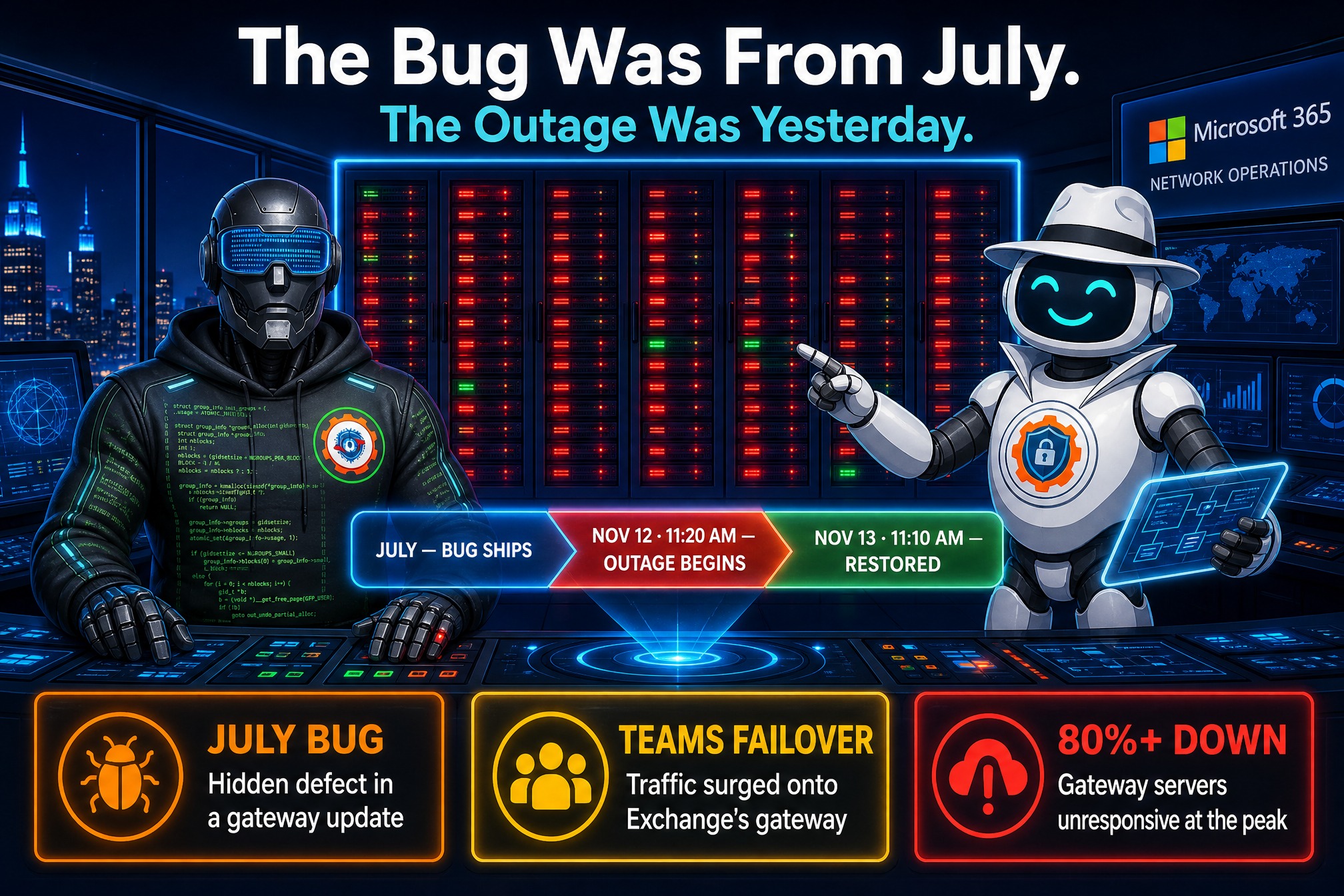
Microsoft finally has an answer for the outage that took down Outlook, Exchange Online, Teams, and Copilot for nearly a full day last week — and the answer is older than the outage itself. The bug that broke Microsoft 365 was introduced in July. It sat quietly in production for more than three months. On November 12, the wrong combination of events set it off.
Microsoft shared its preliminary findings in a post-incident report in the Microsoft 365 Admin Center, and Charles Lamanna, EVP for Copilot, Agents, and Platform, apologized to customers on X on November 16: “We are deeply sorry for the impact to all our customers.”
This is the follow-up to the story we covered as it unfolded. When Outlook went dark at lunch, the first question was whether it was an attack. It wasn’t. When we called it Microsoft’s worst outage ever, the question became what had broken. Now we know: a latent defect in the networking gateway servers — the front door into Microsoft 365 — plus two unlucky circumstances that arrived at the same time.
Three problems, one cascade
Microsoft says three factors acted together. None alone would have been enough.
1. The bug. In July, an update for the Microsoft 365 networking gateway servers shipped with a defect that could overwhelm a server under certain traffic conditions and stop it responding. It ran clean for over three months. A flaw nobody knows about is one nobody watches for.
2. The surge. About 15 hours before the outage, Teams automatically failed over from its alternative gateway to the primary gateway — the one that also serves Exchange Online. That pushed a wave of extra traffic onto servers already carrying the company’s mail load.
3. The missing capacity. Nearly 14% of gateway capacity was already offline for an unrelated issue. The infrastructure could absorb that alone — but not combined with the failover surge.
The result was a cascading failure. As servers stopped responding, traffic was redirected to others, which were overwhelmed in turn and failed as well. In less than two hours, the defect had spread across the fleet. At its lowest point, more than 80% of the networking gateway servers were unresponsive, and regional safeguards failed to contain it.

Why the tests missed it
Why did the bug survive three months of production and a full load-testing program? The tests never reproduced the triggering conditions.
“Our normal load testing did not detect the latent issue because the traffic mix and SKUs used in our labs,” Microsoft wrote. “The contention issue is worsened on machines with more cores and newer hardware; whereas our load testing tended to focus on weaker hardware with fewer cores.”
The bug only bites on the powerful, many-core machines that run the real service; the lab tested on weaker boxes. It hid in the gap between test and production — the oldest blind spot in operations.
Why recovery took so long
The outage began at 11:20 AM ET on Thursday, November 12; full restoration was not confirmed until 11:10 AM ET the next day. Recovery was slow for a simple reason: restarting servers didn’t help, because backed-up traffic overwhelmed them again almost immediately.
Teams, OneDrive, and SharePoint could switch to alternative infrastructure and recover earlier. Exchange Online could not, which is why mailboxes stayed unreachable long after other services came back. Once engineers found the bug, they built a fix, deployed it, and services stabilized through Friday.

Why it matters
Two things this outage was not: a cyberattack, and an AI failure. It was an ordinary defect from an ordinary update that survived because testing didn’t match production. Latent defects are the hardest failures to defend against: they pass every check, run clean for months, then trigger on a combination nobody predicted. The lesson: the gap between test and production is itself a risk, and it needs to be measured, not assumed.
Microsoft says it has increased capacity, improved monitoring, and added safeguards to prevent traffic redirection from triggering similar cascades. A final report is expected later this week — that document, not this preliminary one, is where the real accountability will live.
What admins should check now
1. Read the preliminary report in the Admin Center. Read it before the final report lands — the delta between versions is where the honest detail sits.
2. Review your own service-health history. Check your tenant’s health for November 12–13: who was affected, for how long, and whether mail was delayed rather than lost. Confirm nothing queued during the outage is still stuck, especially on compliance or legal-hold workflows.
3. Re-examine your Teams and Exchange failover posture. The trigger was a failover that concentrated traffic on one gateway. Ask which of your services share infrastructure and what happens when one of them moves. If your continuity plan assumes Exchange Online is always there, test the alternative this week.
4. Hold the final report to four questions. It should answer: what the fix changed, how load testing will match production hardware, what new safeguards stop a cascade like this, and what capacity margin Microsoft will hold in reserve. If any of the four is vague, that is the story to follow.
A bug from July broke a Thursday in November. The outage is over; the questions it raised are not — and the final report is where Microsoft has to answer them.