









SCCM Learning – Part 02: Site System Roles Explained
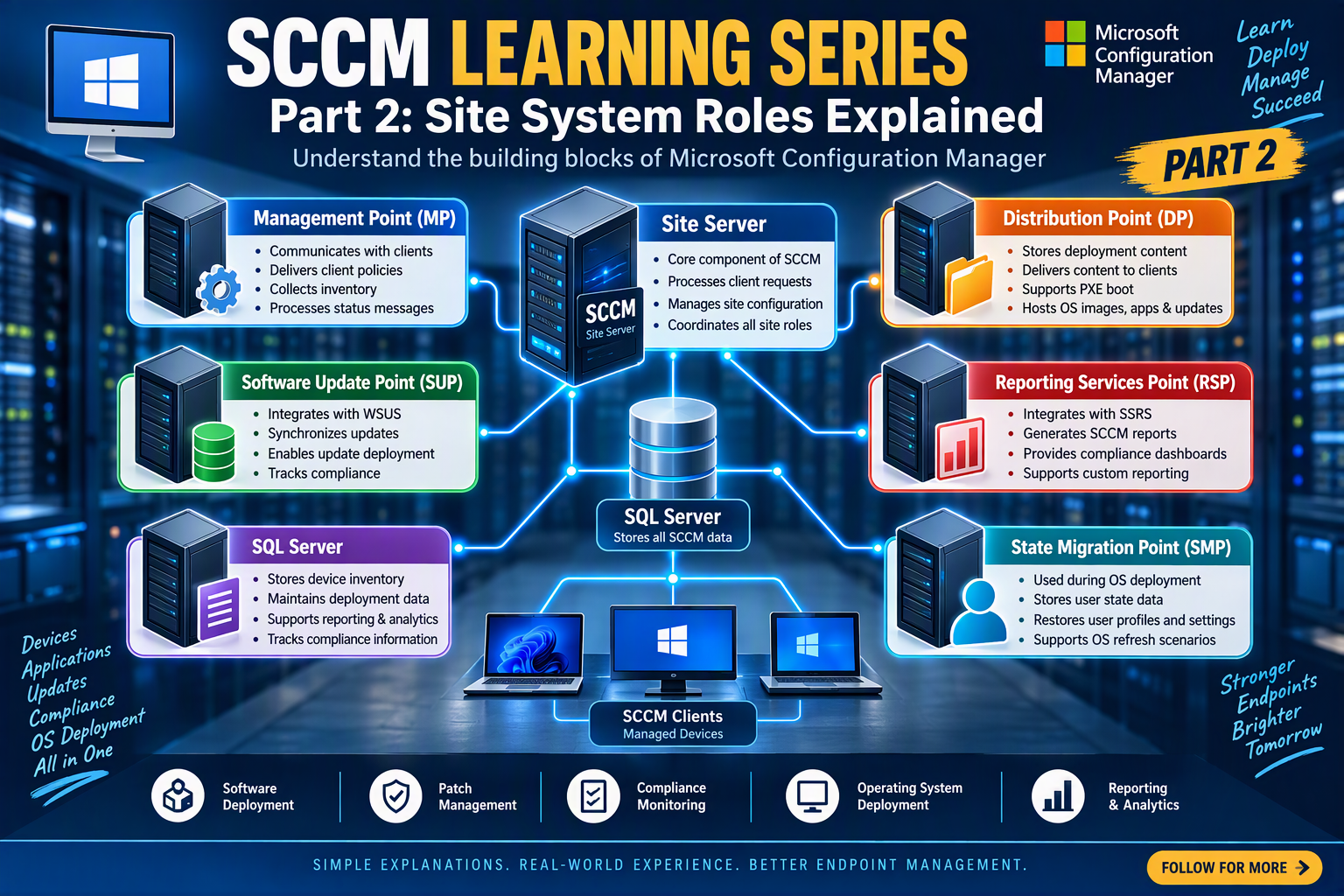
Microsoft Configuration Manager (SCCM/MECM) is built on a collection of Site System Roles that work together to manage devices, deploy applications, deliver updates, and support operating system deployments. Understanding these roles is essential for every SCCM Administrator because each plays a specific part in keeping the environment healthy, secure, and efficient.
In this article, we’ll break down the most important Site System Roles and explain how they work together behind the scenes.
What Are Site System Roles?
Site System Roles are specialized services installed on servers within your SCCM environment. Each role performs a specific function, allowing administrators to distribute content, manage clients, deploy updates, collect inventory data, generate reports, and support operating system deployment scenarios.
A well-designed SCCM infrastructure relies on the proper placement and configuration of these roles to ensure performance, scalability, and reliability.
1. Site Server
The Site Server is the heart of the SCCM environment. It coordinates communication between all site system roles and manages the overall Configuration Manager infrastructure.
Key Responsibilities
- Processes client and administrator requests
- Maintains SCCM site configuration
- Coordinates communication between site roles
- Executes management and deployment tasks
- Stores site configuration information
Why It Matters
Without the Site Server, SCCM cannot function. Every major operation in the environment relies on it to coordinate activities and process data.
2. SQL Server
SQL Server hosts the SCCM database and stores virtually all information related to managed devices.
Key Responsibilities
- Stores device inventory information
- Maintains deployment data
- Tracks software update compliance
- Retains collection information
- Supports reporting and analytics
Why It Matters
The SCCM database is the source of truth for your environment. Accurate reporting, deployments, and compliance monitoring all depend on SQL Server performance.
3. Management Point (MP)
The Management Point acts as the communication bridge between SCCM clients and the Site Server.
Key Responsibilities
- Receives client requests
- Delivers client policies
- Collects hardware and software inventory
- Processes status messages
- Facilitates client communication
Why It Matters
Every SCCM client regularly communicates with a Management Point. If this role becomes unavailable, clients may stop receiving policies and reporting status.
4. Distribution Point (DP)
The Distribution Point stores and delivers deployment content to managed devices.
Key Responsibilities
- Stores applications and packages
- Delivers software updates
- Hosts operating system deployment content
- Supports PXE boot services
- Reduces WAN traffic through content distribution
Why It Matters
Applications, operating systems, and updates are downloaded from Distribution Points. Proper DP placement significantly improves deployment performance.
5. Software Update Point (SUP)
The Software Update Point integrates SCCM with Windows Server Update Services (WSUS) and Microsoft Update.
Key Responsibilities
- Synchronizes update metadata
- Enables software update deployments
- Tracks update compliance
- Supports patch management workflows
- Provides update scanning capabilities
Why It Matters
The SUP is the foundation of patch management within SCCM. Without it, organizations cannot effectively deploy and monitor Windows updates.
6. Reporting Services Point (RSP)
The Reporting Services Point integrates SQL Server Reporting Services (SSRS) with Configuration Manager.
Key Responsibilities
- Generates SCCM reports
- Provides compliance dashboards
- Delivers deployment status reports
- Supports custom reporting
- Enables data-driven decision making
Why It Matters
Reporting gives administrators visibility into deployment success rates, update compliance, and overall endpoint health.
7. State Migration Point (SMP)
The State Migration Point is primarily used during Operating System Deployment (OSD) scenarios.
Key Responsibilities
- Stores user state data temporarily
- Supports operating system refresh scenarios
- Preserves user profiles and settings
- Assists migration during device rebuilds
Why It Matters
When performing operating system refreshes, the SMP helps retain important user data and settings, reducing disruption during migrations.
How These Roles Work Together
A typical SCCM workflow may look like this:
- The administrator creates a deployment.
- The Site Server processes the request.
- SQL Server stores deployment information.
- The Management Point informs clients about the deployment.
- The Distribution Point delivers content.
- The Software Update Point handles update metadata and compliance.
- The Reporting Services Point displays deployment results.
- The State Migration Point preserves user data during OS deployments when needed.
Together, these roles form the backbone of a modern endpoint management solution.
Final Thoughts
Understanding Site System Roles is one of the most important steps in learning SCCM. Once you know how each role functions and how they communicate, troubleshooting becomes much easier, deployments become more predictable, and designing a scalable SCCM infrastructure becomes far less intimidating.
Whether you’re managing software deployments, patching systems, generating compliance reports, or performing operating system deployments, these Site System Roles are the foundation that keeps everything running smoothly.