











From GPO to Microsoft Intune: A Practical Guide to Cloud-First Policy Management
For years, Group Policy Objects (GPOs) have been the backbone of Windows device management in enterprise environments. As organizations continue embracing cloud-first strategies, remote work, and modern device management, the question is no longer whether to move to Microsoft Intune, but how to approach the transition strategically.
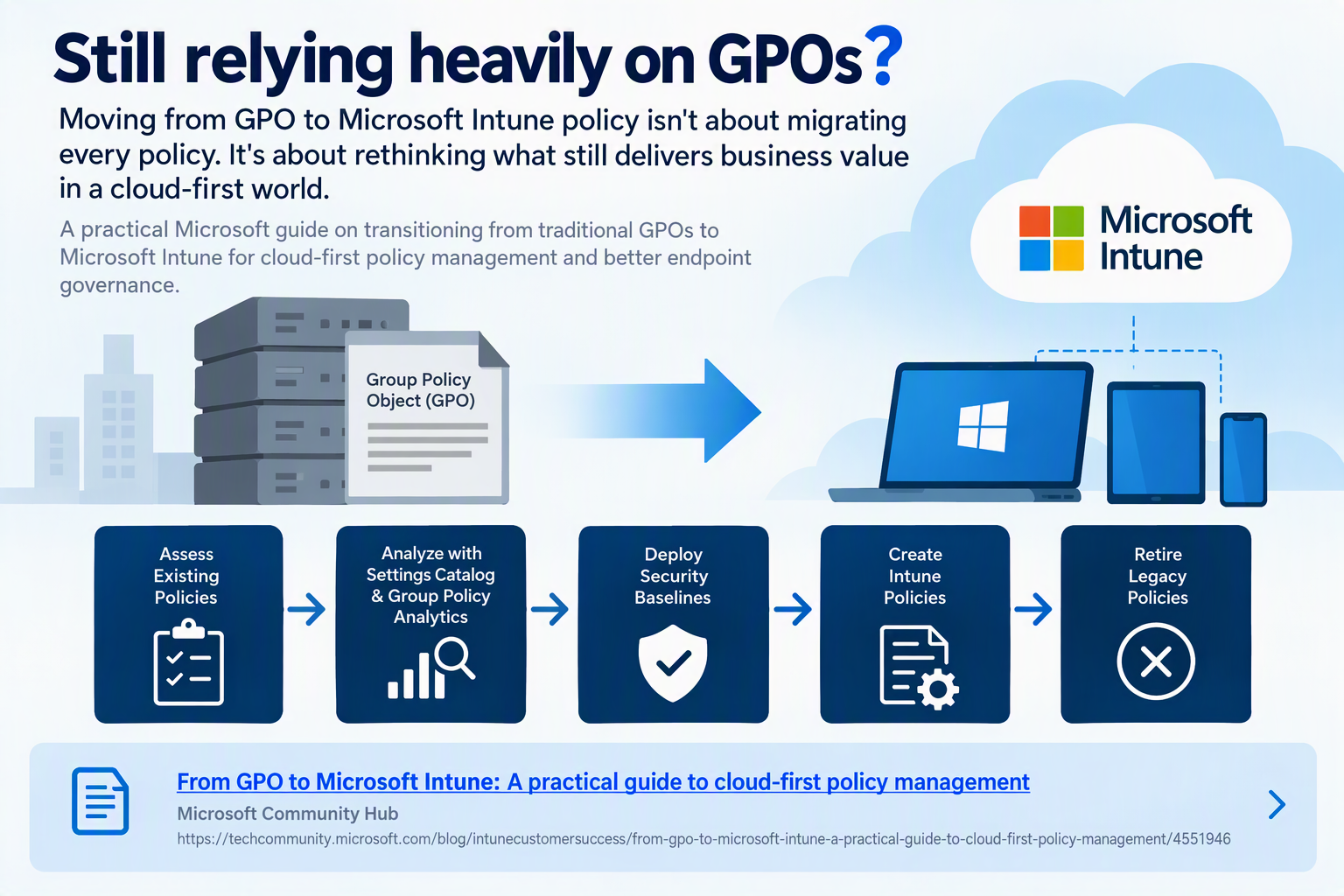
The reality is that migrating from GPOs to Intune is not about recreating every existing policy. Instead, it is about evaluating which configurations still provide business value and adopting a modern management model that aligns with today’s cloud-centric workplace.
Why Modernize Device Management?
Traditional GPOs were designed for a world where devices were predominantly domain-joined and connected to the corporate network. Modern organizations now manage:
- Remote and hybrid workers
- Cloud-native devices
- Bring Your Own Device (BYOD) scenarios
- Mobile-first workforces
- Zero Trust security initiatives
Microsoft Intune provides a centralized cloud-based management platform that enables administrators to manage Windows, macOS, iOS, and Android devices regardless of location.
Start with Assessment, Not Migration
One of the biggest mistakes organizations make is attempting a one-to-one migration of every GPO.
Before migrating any policy, ask:
- Is this policy still required?
- Does it align with current security requirements?
- Is there a modern Intune equivalent?
- Could the setting be replaced by a Security Baseline?
- Does the configuration solve a business problem today?
Many organizations discover that a significant portion of their legacy policies can be retired entirely.
Recommended Migration Approach
1. Assess Existing GPOs
Begin by inventorying current Group Policy settings and identifying:
- Active policies
- Obsolete configurations
- Duplicate settings
- Security-related controls
- User experience customizations
Understanding what exists today is the foundation of a successful modernization effort.
2. Use Group Policy Analytics
Microsoft Intune includes Group Policy Analytics, which helps organizations evaluate existing GPOs and determine how settings map to modern management capabilities.
Benefits include:
- Policy compatibility analysis
- Migration planning insights
- Identification of unsupported settings
- Streamlined transition planning
3. Deploy Security Baselines
Rather than recreating hundreds of security settings individually, leverage Microsoft Security Baselines.
Security Baselines provide:
- Microsoft-recommended configurations
- Industry-aligned security controls
- Consistent policy deployment
- Simplified ongoing management
Many legacy GPO security settings can be replaced entirely using baseline configurations.
4. Create Modern Intune Policies
After identifying the policies worth retaining, implement them using:
- Settings Catalog
- Administrative Templates
- Configuration Profiles
- Endpoint Security Policies
- Compliance Policies
This approach provides greater flexibility while reducing policy complexity.
5. Retire Legacy Policies
Once validation is complete:
- Remove duplicate configurations
- Avoid policy conflicts
- Reduce administrative overhead
- Simplify troubleshooting
Retiring unnecessary policies is often where organizations realize the greatest operational benefits.
Benefits of Moving to Intune
Organizations that modernize policy management often experience:
Improved Security
Intune integrates closely with:
- Microsoft Defender
- Conditional Access
- Microsoft Entra ID
- Zero Trust frameworks
Better User Experience
Policies are delivered through cloud-based management, reducing dependency on VPN connections and corporate network access.
Simplified Administration
Administrators gain:
- Centralized management
- Consistent reporting
- Automated deployment
- Easier lifecycle management
Cloud-First Readiness
Intune enables organizations to support modern workplace initiatives without relying on traditional on-premises infrastructure.
Key Takeaway
The journey from Group Policy to Microsoft Intune should not be viewed as a migration project. It is a modernization initiative.
Successful organizations focus on evaluating existing policies, adopting cloud-native management practices, leveraging Security Baselines, and removing legacy configurations that no longer serve a business purpose.
By taking a strategic approach, IT teams can reduce complexity, strengthen security, and build a management framework designed for the future rather than replicating the past.
Source: Microsoft Community Hub from GPO to Microsoft Intune: A practical guide to cloud-first policy management