







Microsoft Is About to Turn On the Defender for Identity Settings You Turned Off
If you run Microsoft Defender for Identity, there is a change coming that deserves thirty minutes of your attention before Microsoft spends it for you. Microsoft is preparing to automatically enable two MDI capabilities for eligible existing customers — including in environments where an administrator deliberately turned them off. There is a 30-day warning banner in the Defender portal ahead of the flip. Whether this is a helpful nudge or an unwelcome surprise depends entirely on whether you see it coming.
What is changing
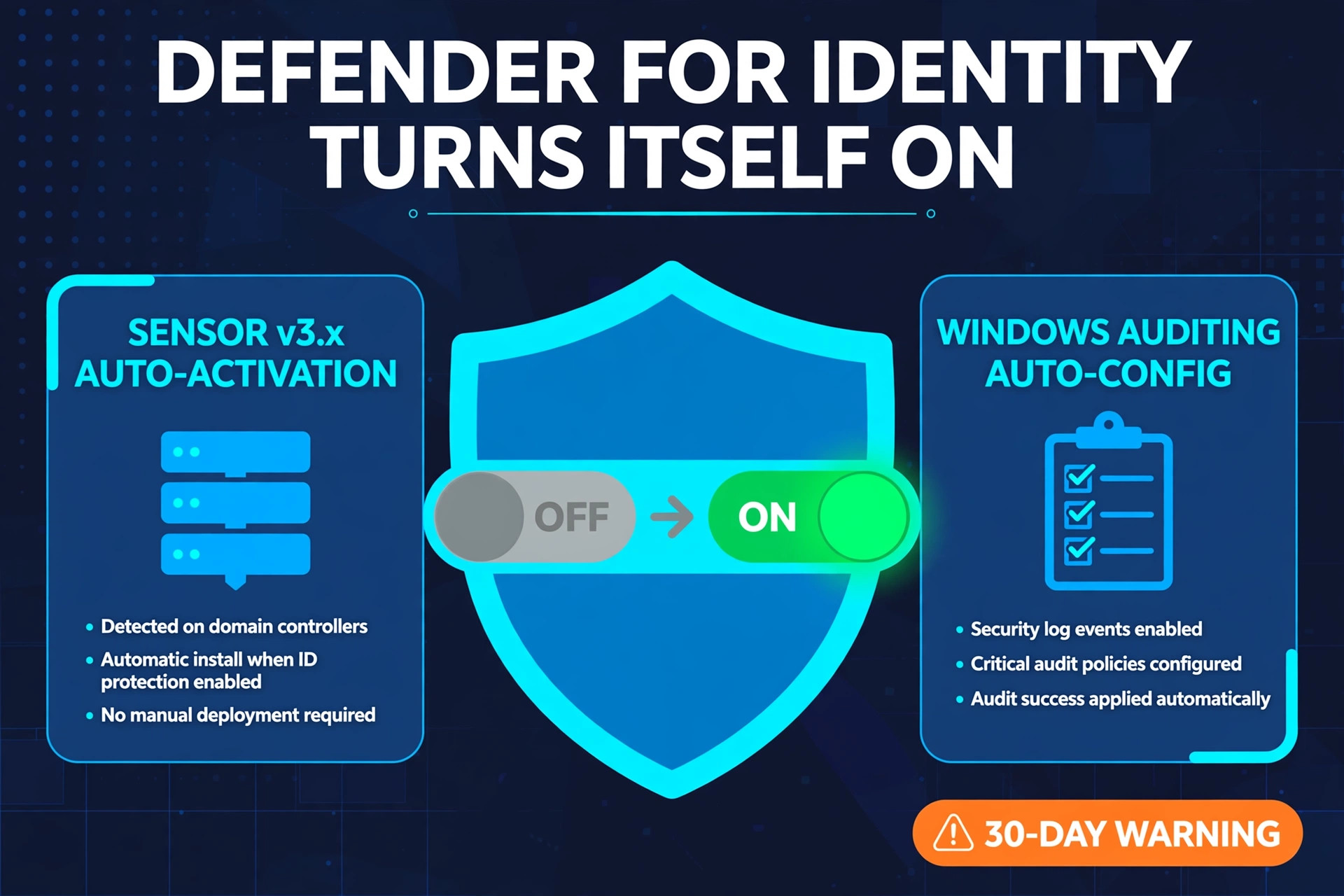
Two settings are moving to secure-by-default, and both will be switched on even where they are currently configured as off:
- Automatic sensor v3.x activation. Eligible MDI sensors will be activated on the current-generation sensor automatically, rather than waiting for an admin to deploy or upgrade them domain controller by domain controller.
- Automatic Windows auditing. The Windows auditing configuration MDI depends on will be set up automatically. Defender for Identity’s detections are only as good as the events your domain controllers generate, and incomplete audit policy has always been one of the most common reasons MDI underperforms in the field.
For environments where both are already enabled, nothing changes. Everyone else gets the portal banner and a 30-day runway to prepare.
Why Microsoft is doing this
The logic is hard to argue with. MDI sits on some of the most attack-relevant telemetry in the enterprise: authentication traffic, directory changes, lateral movement. A sensor fleet that is partially deployed, or domain controllers whose auditing was never fully configured, creates exactly the blind spots identity attacks are designed to find — and “we meant to finish that rollout” has never stopped an incident. Secure-by-default is Microsoft’s answer across the whole stack: the safe configuration becomes the automatic configuration, and choosing something weaker becomes an explicit decision rather than an accident of bandwidth.
The catch is that “automatic” and “your environment” have a complicated history. Sensor activation changes what runs on your domain controllers — the most change-sensitive servers you own. Automatic auditing changes the advanced audit policy those DCs apply, which can collide with carefully tuned Group Policy baselines, swell security event logs, and push more volume into whatever SIEM is collecting them. None of that is a reason to resist the change. All of it is a reason not to be surprised by it.
Your 30-day checklist
- Find the banner and the date. The notification lives in the Defender portal. Put the enablement window on the change calendar now, not the week it lands.
- Inventory your sensors. Review sensor versions and health across every domain controller. Know which DCs are eligible for v3.x activation and which are running older sensors, so the automatic state matches your mental map.
- Diff the auditing. Compare the advanced audit policy MDI requires against what your GPOs actually deliver today — directory service access, Kerberos authentication, and related subcategories. Where they differ, decide whether Microsoft’s automatic configuration or your own standardized GPO gets there first. Your version, applied deliberately, is the one you can document.
- Model the event volume. Fuller auditing means more events per DC. Check security log sizes and retention on the DCs, and if those logs feed Microsoft Sentinel or another SIEM, estimate the ingestion change before the bill explains it to you.
- Pilot on your terms. Nothing stops you enabling both features yourself, on one site or a subset of DCs, during the notice period. A change you schedule, watch, and can roll back beats the same change arriving on Microsoft’s schedule.
- Brief the identity team. New sensors and richer auditing can change what MDI reports — expect a short period of new alerts and tuning as coverage gaps close. That is the sound of the product finally seeing everything.
There is a broader shift worth naming here. For years, the admin’s default posture was that nothing changed in a production identity environment unless they changed it. That era is ending across Microsoft’s cloud-connected stack, one secure-by-default announcement at a time. The admins who thrive in the new model are not the ones who fight every automatic change — they are the ones who read the banners, keep their inventories current, and make each change theirs before it becomes Microsoft’s. This one even gives you thirty days. Use them.
This change was flagged for the community by Microsoft MVP Jeffrey Appel in his LinkedIn post — worth following if you work in Microsoft identity.