














Don’t Ask Again. Your Passwords Are on GitHub.
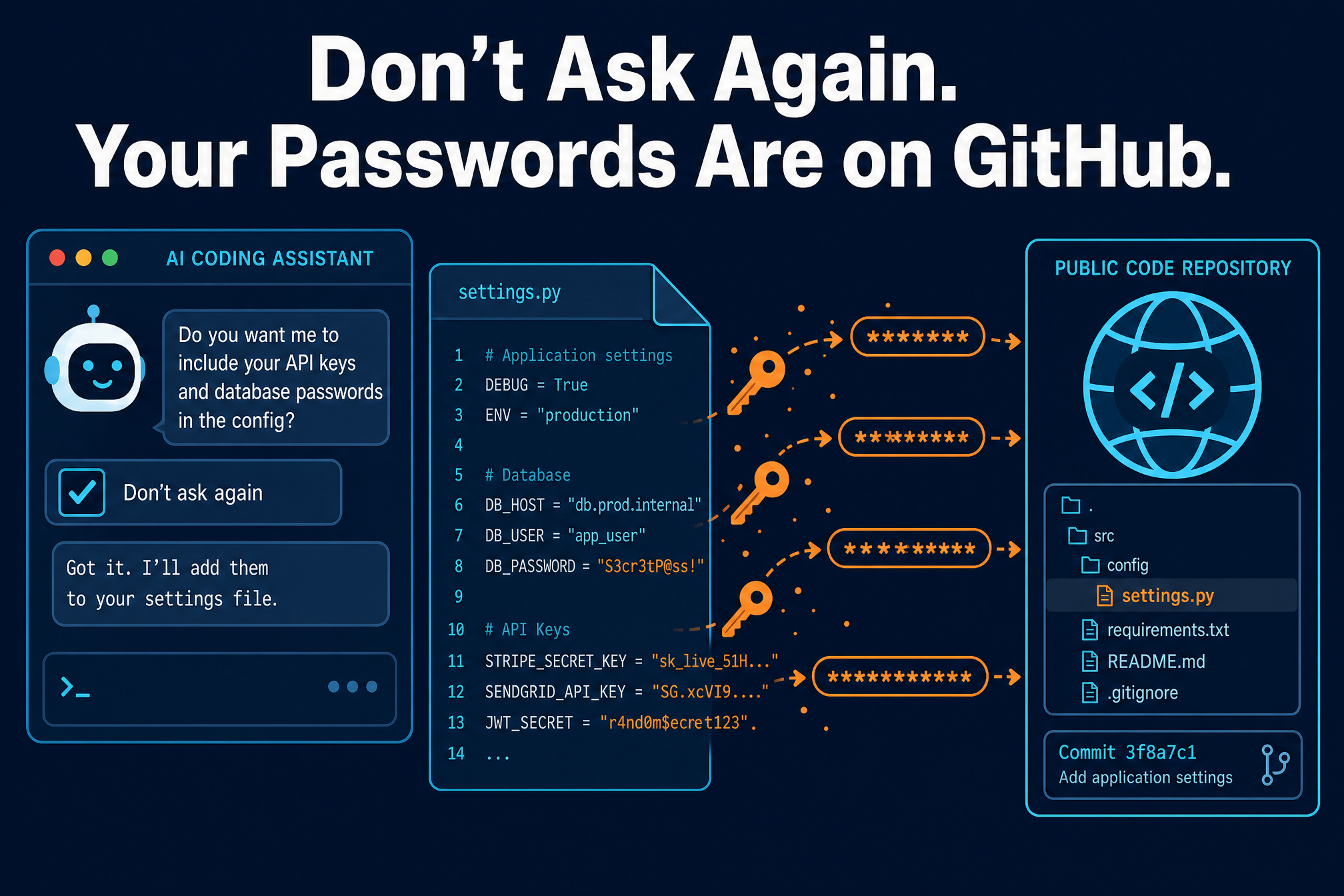
It started with a checkbox. When Claude Code asks whether it can run a command, one of the options is “Yes, and don’t ask again.” Click it, and the AI coding assistant saves that command — word for word, password and all — into a settings file inside your project. Researchers now say that convenience has put 2,539 secrets into public GitHub repositories, where anyone can read them.
The findings come from Apiiro, which searched public GitHub for copies of the file, .claude/settings.local.json. It found 104,185 copies across 103,617 repositories; 1,122 of them hold at least one secret, totaling 1,379 different passwords, tokens and keys. Counting older versions, forks, shared settings files and saved chat logs, the total reaches 2,539 secrets across 1,994 repositories.
What happened
The mechanism is simple, and that is the problem. By default, Claude Code asks before running most shell commands. Pick “Yes, and don’t ask again,” and it saves an allow rule in .claude/settings.local.json inside the project, so matching commands run without asking in later sessions. Sometimes the rule is a pattern like npm test *; sometimes it is one exact command — and when it is, any password or token typed into it is saved too, in plain text.
What Apiiro found inside those files is not theoretical. More than a third of the secrets open a database directly, including 379 database passwords. The rest include 43 SSH logins for public servers, 42 tokens for GitHub, GitLab and npm, and 23 AWS keys. The worst cases include a database vendor’s own admin-level cloud key and the owner password of a medical-records database — and one company notified this week confirmed its key had been live.

Deleting the file does not undo the leak. As of Monday, every file with a secret was still on its repository’s default branch, and in half of those repositories it had been there for at least 217 days. Older versions hold 734 more secrets across 509 repositories, and forks spread them further: 211 forks of 74 repositories carry the same secrets as the originals.
Claude Code does try to keep the file out of git: the first time it writes the file, it adds it to the user’s global git excludes. But that protection lives in one user’s settings on one computer — Claude Code never adds the file to the project’s own .gitignore, so it does not travel with the project. In 539 of the 1,105 repositories traced, a commit listing Claude as a co-author changed the file: Claude often commits the file itself.
Standard secret scanners miss much of this. Gitleaks flagged 564 of the 1,122 files with a secret, TruffleHog flagged 643, and neither flagged 215 — most misses are passwords typed inside commands, which look like ordinary words to a scanner. And of 16 coding agents whose documentation the researchers compared, Claude Code is the only one confirmed to save the full approved command in a project file by default. Users reported this as early as August 2025; the reports were closed by an automated bot as “not planned,” the most recent yesterday, with no reply from Anthropic.
Why it matters
A leaked password is not a leak of a password — it is a leak of whatever that password opens. A database password is the customer table. An AWS key is the cloud account. A GitHub token is the source code and, often, the deployment pipeline. And because the secrets sat in public repositories for months, the question is not whether someone could have found them, but whether anyone did. Apiiro does not say.
The deeper problem is that the leak came from a feature working exactly as designed. Nobody misconfigured anything. A developer clicked a button that promised convenience, and the tool quietly wrote their credentials into a file that the tool itself could then commit. It is the same class of problem as the one we covered this week, where a browser extension could whisper instructions to Claude Desktop and have it run code — AI assistants act on your behalf, and every action they take is one you did not personally check. The same week, one operator ran twelve AI agents against hundreds of organizations, with Claude Code among the tools building the attack infrastructure. The agents are not the enemy. The gap is that the guardrails around them were built for a slower world.
What to do now
1. Search your organization for the files — including git history — and rotate first. Look for both settings files in every repository, and check each repository’s history for them even where the files are gone. Rotate every password, token and key the files have ever held before deleting anything, starting with credentials paired with a public server, because those give access immediately.
2. Stop tracking the local file and add it to the project’s own .gitignore. Run git rm --cached .claude/settings.local.json and add the file to the repository’s .gitignore, so the protection travels with the project. Add it to your organization’s .gitignore templates too. Then open the file on your own computer and delete every rule that contains a secret — even a copy that never reached GitHub matters, since the file can also end up in an npm package, a Docker image or a zip archive.
3. Keep secrets out of commands. Refer to them as variables from a secrets manager, such as $DB_URL, so the saved rule holds the variable name and not the secret. And approve patterns, such as Bash(npm run:*), instead of single commands.
4. Treat agent folders like .env files. For security teams: .claude/, .cursor/, .gemini/ and .specstory/, plus agent memory files, hold secrets on laptops as well as in repositories. Add them to pre-commit and CI scanning, including git history, and make sure the scanner catches passwords inside commands, not just known key formats.
A checkbox that says “don’t ask again” should not mean “don’t tell me you saved my password in plain text.” Until the tool changes, the check is yours to make — and the rotation is yours to do first.
One thought on “Don’t Ask Again. Your Passwords Are on GitHub.”